dēzl™
GarminAuto & Vehicles
4.72.42K Reviews
- Version
- 2.10.11
- Installs
- 100.00K
- Age Rating
- Everyone
Screenshots
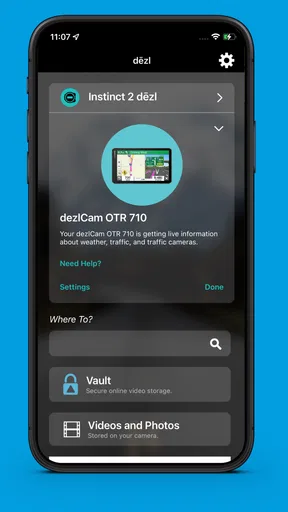
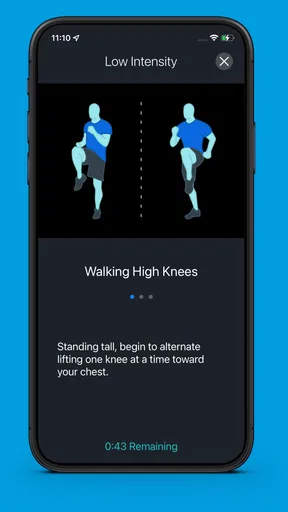
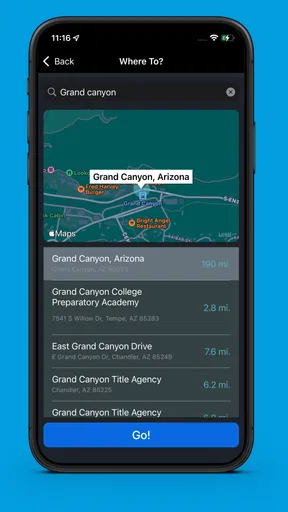
Our Review of dēzl™
 Analysis by Appyee
I approached dēzl™ as a practical companion for people who spend serious time on the road rather than as another general-purpose driving app. Developed by Garmin for the Auto & Vehicles category, it is free to use and aimed at Everyone, which makes it easy to try even if you are only beginning to explore Garmin’s truck-focused ecosystem. My overall impression is positive: it feels most useful when it becomes part of a repeatable driving routine, not when it is treated as a magical replacement for every navigation tool you already use.
The app’s store summary, “CONNECT FOR THE LONG HAUL,” captures its intended audience better than a long feature list would. This is built around staying connected with a dēzl setup and making the information you need easier to reach while travelling. I found that distinction important. If you want a simple map for an occasional car trip, a mainstream navigation app may feel quicker. If you drive professionally or regularly depend on Garmin’s dēzl hardware, the app makes much more sense.
Garmin’s reputation naturally raises expectations, and the response from users is strong: it holds a 4.7 average from around 9,300 ratings and has more than 100,000 installs. Those figures do not make it perfect, but they do suggest that the basic idea works for a substantial group of drivers. I would describe it as a focused connection tool whose value grows with consistent use, careful setup, and a compatible dēzl workflow.
How I would build a dependable everyday workflow
I would make the routine resilient by deciding in advance what “ready” looks like: the phone is secured, the app has opened, and the Garmin equipment is available before I move. That gives me a clear stopping point instead of inviting repeated checks on the road. I would also keep a simple fallback navigation option in mind for a connection problem, so a hiccup does not turn into rushed troubleshooting.
Start before the vehicle moves
The best way to use dēzl™ is to prepare while parked. I would install it on a phone running Android 9 or later, open it before leaving, and give myself time to understand how it communicates with the rest of my Garmin setup. That small pause matters more than it sounds. Trying to discover connection steps, notifications, or device controls while pulling away from a loading area creates exactly the kind of distraction a driving companion should reduce.
My baseline routine would be simple. I would open the app, confirm that the expected dēzl device is available, check that the phone is connected in the way I want, and then leave the phone in a fixed, reachable position. I would avoid repeatedly picking it up during a trip. The app is more useful when it supports the driver’s established process instead of becoming another screen demanding attention.
For a long-distance driver, this can become a useful pre-departure checklist. Before starting the engine, I would verify the phone’s battery situation, make sure the chosen connection is active, and confirm that the Garmin unit is responding as expected. I would also take a moment to review any information I expect to use during the next leg. This is not exciting advice, but it prevents a common failure pattern: discovering a connection problem only after the vehicle is already moving.
A realistic day on the road
Imagine leaving a depot early in the morning with several hours of driving ahead. I would use the app during the preparation stage rather than constantly interacting with it on the motorway. Once the dēzl system is ready, the phone can stay put while I concentrate on traffic, lane changes, rest decisions, and the practical demands of the route.
At a planned stop, I would use the break to check the connection again and adjust anything that needs attention. That is a better moment to deal with a delayed pairing, a changed device arrangement, or a notification preference than the middle of a busy junction. Experienced users often get more from an app like this not because they tap more, but because they choose better times to tap.
This workflow also helps separate the roles of the phone and the dedicated Garmin equipment. The phone is convenient for setup and quick checks, while the dēzl hardware remains the more appropriate place to keep driving information visible. I would not treat the mobile app as an excuse to hold the phone in my hand or to replace a proper dashboard arrangement.
Who benefits most from this approach
The strongest fit is someone who already owns or plans to use a compatible Garmin dēzl device and wants a more connected experience around it. Professional drivers, delivery workers, and people who regularly drive larger vehicles are more likely to appreciate the focused design than occasional motorists are. The app’s free price also lowers the risk of trying it alongside an existing Garmin routine.
It is less compelling for a driver who only needs turn-by-turn directions once in a while, or for somebody who wants one app to handle every aspect of travel without depending on additional Garmin equipment. In that situation, a familiar phone-navigation app may be easier because it is designed as a complete standalone experience. dēzl is not the choice I would make simply because it is free; I would choose it because its connection to the dēzl family is relevant to my driving.
Settings, shortcuts, and the habits that make it smoother
I would keep the workflow lean by changing one setting at a time and noting what actually improves the next parked test. If I share a vehicle, I would agree on which phone normally connects and leave the setup in a predictable state for the next driver. Those small habits make it easier to spot a genuine fault rather than mistaking a changed preference or device handoff for one.
Settings worth checking first
I would begin with the settings that affect attention rather than hunting for obscure options. Notifications deserve a deliberate review. Too many alerts can turn a useful connection into background noise, while too few may make the app feel unresponsive. My preference would be to allow only the information that genuinely helps during a trip and to keep nonessential interruptions out of the driving period.
I would also check how the app behaves when the phone is locked, when the vehicle connection changes, and when the dēzl device is not immediately available. The exact experience can depend on the phone and the connected Garmin equipment, so I would test these situations while parked. A few minutes spent learning what happens after restarting the phone or leaving the vehicle can save frustration later.
Battery management is another practical consideration. A driver may spend a full day away from a charger, and a connection-focused app can become inconvenient if the phone is already under pressure from other services. I would keep the phone charging in a safe, stable mount and avoid leaving unnecessary apps active. This is not a reason to reject dēzl, but it is a reason to include the phone in the vehicle’s preparation checklist.
Use a repeatable setup instead of improvising
One of the less obvious strengths of a focused app is that it rewards consistency. I would keep the same phone location, the same cable or wireless arrangement when applicable, and the same order of checks each time I start work. That makes problems easier to identify. If something changes, I know whether the issue is the phone, the connection, the Garmin unit, or my own routine.
I would also avoid changing several settings at once. If notifications feel excessive, I would adjust those first and observe the next trip. If the connection is unreliable, I would test that separately. This method may sound methodical, but it is especially valuable for drivers who cannot afford to troubleshoot while under time pressure.
Another useful habit is to review the app after an operating-system update or a major change to the phone. The current version is 2.10.11, and keeping software current is sensible, but an update should still be followed by a quick parked test. I would check that the app opens normally, sees the expected Garmin equipment, and behaves as it did before. That is a better approach than assuming every update leaves a vehicle setup untouched.
Faster patterns for experienced users
Once the basic workflow is familiar, I would reduce unnecessary steps by creating a fixed sequence: phone placed, app opened, device checked, notifications reviewed, and phone secured. The shortcut is not a secret button; it is the order itself. Repetition turns a collection of small actions into a routine that takes less mental effort.
I would keep the app near the other tools I use before driving, but I would not place it where an accidental tap is likely. The goal is quick access while parked, not constant visual temptation. If I share the vehicle, I would also make sure the next driver understands which phone should connect and what the normal ready state looks like. That prevents the app from being blamed for a connection mix-up caused by multiple devices.
For people who alternate between personal and work vehicles, a written or remembered setup checklist is particularly useful. I would note which dēzl unit belongs with which vehicle and test the arrangement before leaving the yard. The app becomes much easier to trust when the surrounding process is clear. Without that process, even a well-designed connection tool can feel unpredictable.
Where it differs from ordinary navigation apps
Compared with a typical phone-navigation app, dēzl feels narrower and more equipment-oriented. A general navigation app is usually the obvious choice when I need a map immediately, want a broad travel-planning experience, or do not own dedicated Garmin hardware. It may also be more convenient for walking, cycling, or casual passenger use, depending on the app.
dēzl’s advantage is focus. It belongs in a workflow built around Garmin’s truck-driving equipment, where the phone is not expected to do everything by itself. That can make the experience calmer for a professional driver who wants the phone to support the vehicle system rather than compete with it. The trade-off is dependence: without the relevant Garmin context, the app’s purpose is harder to justify.
I would therefore avoid comparing it only by asking which app has the most visible map features. The more useful question is whether I want a standalone navigation service or a connected layer around a dēzl setup. Those are different jobs. Choosing the wrong one can lead to disappointment even when both products are individually well made.
Advanced limits and the points where I would be cautious
I would be cautious about treating a successful first connection as proof that every later trip will behave identically. Phone restarts, software changes, and switching vehicles are sensible moments to recheck the setup while stationary, especially before a demanding drive. If the same issue persists after a calm restart and a basic connection check, I would rely on a safe alternative and seek help through Garmin’s usual support channels rather than keep experimenting at the roadside.
Connection is helpful, but it adds another point of failure
The main limitation is inherent in the app’s role. A connected experience involves the phone, the app, the vehicle arrangement, and the Garmin device. If any part is unavailable or behaves differently after a restart, the overall workflow may need attention. A standalone navigation app has its own limitations, but it does not necessarily ask me to manage the same relationship between phone and dedicated equipment.
That means I would never make the app my only plan for an unfamiliar route. I would prepare the dēzl system properly, keep the phone usable, and follow sensible driving practices rather than relying on last-second interaction. If the connection fails, the right response is to pull over safely and troubleshoot, not to keep tapping while moving.
It is not a universal solution for every driver
Someone who drives a small car occasionally may find the dēzl focus unnecessary. The free price is attractive, but free does not automatically mean useful for every situation. If my main need were a quick destination search, live traffic, or a broad collection of general travel tools, I would first look at a mainstream navigation app that is designed to stand alone.
I would also think carefully before recommending it to a driver who dislikes managing connected accessories. Some people want to open one app and go. For them, the extra preparation may feel like friction rather than reassurance. dēzl is better for a person who values an organised vehicle routine and accepts that the app works as part of a wider Garmin arrangement.
What I would check before committing to it
Before making it part of my daily work, I would answer a few practical questions through a stationary test. Does my phone run Android 9 or later? Does the app recognise the dēzl equipment I intend to use? Can I complete the connection without repeatedly reopening screens? Do notifications behave in a way that feels safe and manageable? Can I recover calmly after restarting the phone?
I would also test the setup at home or in a depot rather than waiting for the first live delivery. This is where the app’s free availability helps: I can evaluate the workflow without committing money, then decide whether the connection is genuinely useful. If the test reveals that I prefer a simple standalone navigation experience, I have lost very little besides setup time.
Garmin’s role and long-term confidence
The developer is Garmin, which gives the app a clear identity rather than leaving it as an anonymous accessory tool. The release date was January 26, 2022, and the current version shows that the app has continued as a maintained product rather than being frozen at its original launch. I still would not assume that every phone model or vehicle arrangement will behave identically, but the ongoing version history makes it reasonable to keep evaluating.
The Everyone content rating also makes the app broadly approachable from an age standpoint. In practice, the more important question is driving responsibility: the app should be configured and used in a way that keeps attention on the road. A friendly age rating does not remove the need for safe handling, secure mounting, and parked setup.
My verdict after building a repeatable routine
I recommend dēzl to drivers who are already invested in Garmin’s truck-oriented equipment and want their phone to fit neatly into that system. Its real strength is not a flashy standalone feature; it is the way a focused connection app can make a familiar road routine more orderly. Once I decide when to open it, what to check, and when to leave it alone, the experience becomes much less distracting.
I would not recommend it as the first choice for somebody seeking a general navigation app for every kind of journey. The dependence on a dēzl setup is a genuine trade-off, and the preparation required may feel excessive for occasional driving. In those cases, a conventional phone-navigation alternative is likely to be simpler and more immediately useful.
For the right user, though, the free download is worth trying. I would install it, test the connection while parked, adjust notification behaviour, and run one complete short trip before trusting it on a demanding route. That process reveals more than a store description can: whether the app fits my phone, my Garmin equipment, and my habits.
My final judgement is that dēzl™ is best understood as a disciplined driver’s companion, not a replacement for every road app. Its value appears when settings, shortcuts, and preparation work together. If that sounds like the way you already approach long-distance driving, Garmin’s app is a sensible addition. If you want instant, equipment-free navigation, I would choose something broader instead.
Privacy and Permissions
See what permissions an app requests and how it handles your data.
- Contacts
- read your contacts
- Location
- approximate location (network-based), precise location (GPS and network-based)
- SMS
- send SMS messages
- Phone
- directly call phone numbers, read call log, read phone status and identity
- Photos/Media/Files
- read the contents of your USB storage, modify or delete the contents of your USB storage
- Storage
- read the contents of your USB storage, modify or delete the contents of your USB storage
- Camera
- take pictures and videos
- Microphone
- record audio
- Wi-Fi connection information
- view Wi-Fi connections
- Device ID & call information
- read phone status and identity
- Other
- view network connections, pair with Bluetooth devices, access Bluetooth settings, change network connectivity, allow Wi-Fi Multicast reception, connect and disconnect from Wi-Fi, full network access, change your audio settings, run at startup, draw over other apps, prevent device from sleeping
Verdict
Strengths of dēzl™
- Designed for professional truck drivers and commercial vehicle routes.
- Provides truck-specific navigation based on vehicle dimensions and load details.
- Large, clear maps are easy to read while driving.
- Offers useful alerts for sharp turns, steep grades, and restricted roads.
- Can pair with compatible Garmin accessories for added driving information.
Limitations of dēzl™
- Many advanced features require a compatible Garmin dēzl device.
- Truck routing depends on accurate vehicle and cargo information.
- Some maps and services may require subscriptions or paid updates.
- The interface can feel complex for drivers new to Garmin systems.
- Battery and background GPS use may be high during extended trips.
Other Releases by Garmin
View All
Navionics® Boating
Maps & Navigation2.9

Garmin Explore™
Maps & Navigation3.5

Garmin Drive™
Auto & Vehicles3.8

Garmin Golf
Sports4.7
Similar Picks in This Category
View All
Android Auto
Google LLC4.1

maxim — order a taxi & food
PT. SITO4.7

Штрафы ГИБДД: проверка с фото
Pays LLC – Штрафы ГИБДД4.7

Номерограм – проверка авто
Авто Ассист4.8

Дром Авто
Дром4.9

Frequently Asked Questions
What is dēzl™ and who is it designed for?
dēzl™ is a navigation and fleet-support app from Garmin, designed mainly for professional truck drivers and other commercial vehicle operators. It can provide route guidance, traffic information, truck-focused points of interest, and access to compatible Garmin dēzl devices. Before downloading, drivers should confirm that their phone, region, vehicle profile, and Garmin hardware are supported, especially if they need specialized truck routing rather than ordinary car navigation.
Does dēzl™ provide truck-specific navigation and routing?
Yes, dēzl™ is intended to support truck-oriented navigation when used with compatible Garmin equipment and properly configured vehicle information. Depending on the device, region, and available services, routes may consider factors such as vehicle height, weight, length, and hazardous-material restrictions. Drivers should still verify signs, road conditions, and local regulations because digital routing can contain outdated information or may not reflect temporary restrictions.
Can I use dēzl™ without a compatible Garmin device?
The app’s available functions depend on the specific dēzl model and connected Garmin hardware. Some features may work as a companion for planning routes, reviewing information, or managing device content, while other capabilities require pairing with a compatible navigator. Users should check the app listing and Garmin’s compatibility information before downloading, since not every phone or dēzl device supports every feature.
Does dēzl™ require an internet connection or use mobile data?
An internet connection may be needed for setup, account access, map or software updates, traffic services, weather information, live data, and communication with connected devices. Some navigation functions can remain available through the paired Garmin navigator after maps are stored on the device, but this varies by model and service. Drivers should download updates over Wi-Fi when possible and review mobile-data settings before traveling.
Is dēzl™ free to download, and are there additional costs?
The dēzl™ app may be available to download without an upfront charge, but the overall experience can depend on owning a compatible Garmin dēzl navigator and using optional connected services. Certain features may require a Garmin account, supported subscriptions, paid services, or additional hardware. Before relying on it for work, review the current store listing, in-app terms, and Garmin pricing because availability and costs can vary by country.
